
Samsung Galaxy Watch Ultra LTE: eSIM & Setup Guide

In short, here’s what you’ll discover in this article: the Samsung Galaxy Watch Ultra LTE can connect without your phone nearby, but it needs an eligible watch plan. Learn how activation works, what to check before buying, and why a phone travel eSIM is not a watch plan.
Samsung Galaxy Watch Ultra LTE: the short answer
LTE lets your watch use a cellular network independently of a nearby phone. With compatible service, you can make calls, receive messages and use connected apps from your wrist. However, buying LTE hardware does not automatically activate cellular service. The watch and its subscription are separate purchases.
Samsung sells the Galaxy Watch Ultra with Bluetooth and LTE capability. You can still use it with your paired phone without activating a watch subscription. That makes the key buying question practical: will you regularly leave your phone behind?
This guide focuses on the original Galaxy Watch Ultra and its 2025 refresh. Samsung also lists the newer Galaxy Watch Ultra2 in its 2026 lineup. Check the exact generation in a retailer’s listing rather than treating every “Ultra LTE” result as the same device.
What changes when you activate LTE?
Think of LTE as another connection route, not a replacement for initial phone setup. When your phone is nearby, Bluetooth can link the two devices. Away from it, an activated watch can connect through a supported cellular network.
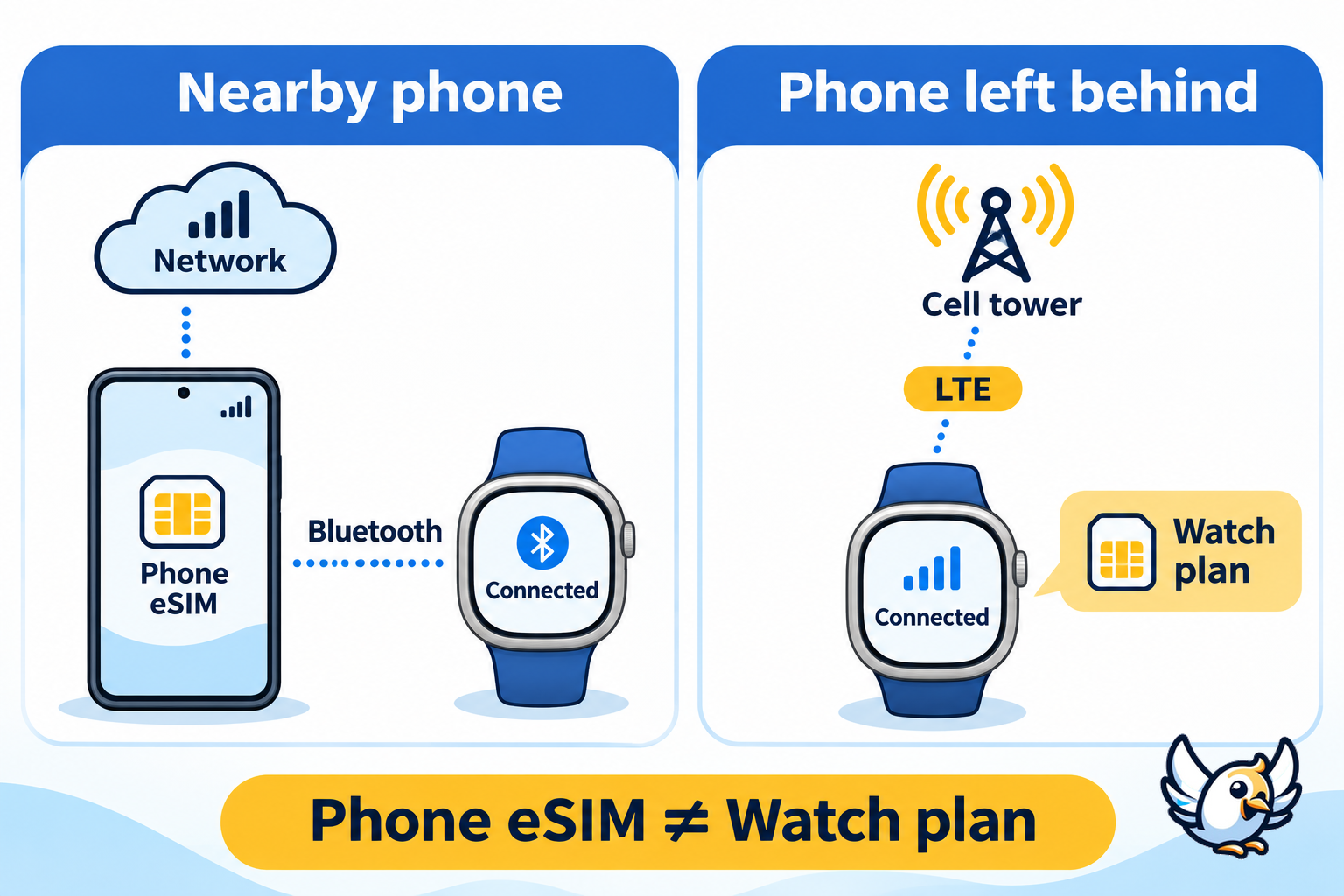
| Situation | Connection to consider | Important limitation |
|---|---|---|
| Your phone stays nearby | Bluetooth to the paired phone | You may not need a watch subscription for your routine. |
| You run without your phone | Watch LTE with an eligible plan | Coverage and supported calling features still matter. |
| You use apps on Wi-Fi | A compatible Wi-Fi connection | App and messaging requirements can differ. |
| You travel internationally | Carrier-approved watch roaming, if available | Phone roaming benefits do not prove watch roaming support. |
| You buy a phone travel eSIM | Data on the compatible phone | It does not automatically provision the watch. |
Check each app rather than assuming every feature behaves identically. Before relying on messages during a workout, test what happens when the phone is out of range and when it is switched off. Include the services you actually use, not just the watch’s signal indicator.
Check these details before buying
Start with your carrier, not the watch’s colour. An unlocked device label does not guarantee that a network will activate its wearable service. Ask the carrier to check the exact regional model and IMEI, especially for an imported or second-hand watch.
- Phone compatibility: confirm that your Android phone meets the requirements for the exact watch generation.
- Plan eligibility: ask whether your current phone subscription supports a Galaxy Watch add-on.
- Number sharing: confirm whether calls use your existing number and what must remain active on the phone.
- Total commitment: review the recurring watch subscription, activation conditions and cancellation terms.
- Travel support: request watch-specific roaming details for your destination.
Samsung lists Android 11 or later for the original Ultra and its 2025 refresh, with compatible non-Samsung Android phones also supported. Some features require a Galaxy phone. It is not an iPhone companion. Check the exact generation’s requirements rather than an older, general Galaxy Watch setup article.
⚠️ Avoid buying an imported watch solely because it says “LTE unlocked.” Confirm local activation support before the return window closes.
How to activate the Galaxy Watch Ultra LTE
Samsung’s official LTE activation instructions use the Galaxy Wearable app. Your carrier handles eligibility and provisioning, so the screens may vary. Have your phone, watch and carrier account details ready.
- Pair the watch with your compatible Android phone in Galaxy Wearable.
- Check that the phone has an active physical SIM or eSIM and an internet connection.
- Open Watch settings → Mobile plans in Galaxy Wearable.
- Follow the carrier prompts to select or activate an eligible wearable plan.
- If requested, use the activation details or QR code supplied specifically for the watch by your carrier.
- Once activation completes, test supported calls and data away from the phone’s Bluetooth connection.
Samsung’s US instructions reference AT&T, T-Mobile and Verizon and say the watch service must match your phone’s carrier. These are carrier activation flows, not the same process as installing a generic travel eSIM on a smartphone.
💡 Activate and test the watch at home before your first phone-free outing. Check a normal call and your essential apps while you still have access to carrier support.
Can you install a travel eSIM on the watch?
Do not assume that a phone eSIM will work on the Galaxy Watch Ultra. An embedded SIM is a hardware capability; the carrier must also support the watch and its provisioning process. A phone data package is not evidence of wearable compatibility.
Our article research returned smartphone travel offers, but no verified Galaxy Watch Ultra plan. We therefore do not recommend any of those offers for direct watch installation. Only buy a watch plan after its provider explicitly confirms your model, country and activation method.
If you also need mobile data on your Samsung phone, treat that as a separate decision. First check the handset with our compatibility checker, then follow our Samsung smartphone eSIM activation guide. This check concerns the phone, not watch-plan eligibility.
Is your phone eSIM-compatible?
Check the full list of compatible smartphones: iPhone, Samsung, Google Pixel and 200+ models.
Check compatibilityUsing your Ultra LTE abroad
Ask about smartwatch roaming specifically. Your phone may work abroad while the watch’s independent cellular connection does not. Request confirmation of supported countries, calls, messaging and data, rather than accepting a general answer about your phone plan.
Before departure, ask your carrier three concrete questions: can this watch register on networks in your destination, are calls and messages included, and must your phone remain online? Save the answer with your account details. If support cannot confirm wearable roaming, plan to keep your phone with you.
If you use a travel eSIM on your phone, keep the watch connection question separate. Our guide to data roaming settings on Samsung phones covers handset settings. Do not assume those settings enable roaming on the watch.
Battery life: do not confuse power saving with LTE use
Samsung advertises up to 100 hours in Power Saving Mode for this Ultra generation. That is not a promise of continuous LTE calling, streaming or navigation. Its Galaxy Watch Ultra product information separates power-saving claims from other usage conditions.
For a useful personal benchmark, test your normal workout with your usual apps and display settings. Judge battery life against your own routine, not a maximum headline. For longer outings, consider downloading supported content beforehand and leave enough battery margin for the return journey.
FAQ
Does the Samsung Galaxy Watch Ultra LTE need a SIM card?
It uses an embedded eSIM, not a removable SIM card. Independent cellular service requires a compatible watch plan and successful carrier activation.
Can I use the Galaxy Watch Ultra without paying for LTE?
Yes. You can use it with your paired phone without activating a cellular subscription. LTE service becomes relevant when you want supported network features away from the phone and Wi-Fi.
Can the watch share my phone number?
Compatible carriers can provide number-sharing service. Availability depends on your carrier and subscription. Confirm calling and messaging behaviour, including any requirement for the paired phone to remain online.
Why will my Galaxy Watch Ultra not activate?
Ask the carrier to verify plan eligibility and the watch’s IMEI or EID. Samsung lists these identifiers under About watch, with wording varying by device. Check provisioning before deleting the existing plan or resetting the watch.
Is LTE worth activating?
Yes, if leaving your phone behind solves a real problem, such as carrying it during runs. If your phone is almost always with you, start without a watch subscription and activate one only when you need it.

Passionate about travel and tech, I have combined these two worlds to help travelers understand the numerous options to get Internet access abroad and identify the best option for them. As a software development engineer, I put my skills at the service of simple, practical and transparent content. My goal is to give you all the keys to stay connected easily and at the best price during your trips. 🌍📲